| |




Powered by routers from


|
 |

EmailDiversion tm
EmailDiversion is included free of charge with
your domain. All email to your domain will be received on our servers and then delivered to
an email address of your choice.
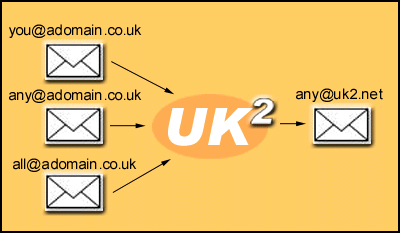
You can change EmailDiversion online by simply logging into our menu
system, enter a new email address and click update. The address that you are
diverting your email
to is not visible to anyone.
CLICK
HERE FOR DEMONSTRATION
Some old Internet companies only offer to divert a single email address
on your domain and not all email. Hmm. Not with us. You will get everything
sent to your domain.

EXTRA EMAILDIVERSION
As an extra service you can upgrade your
account for additional diversion addresses. It simply means that you
can access a post office function and sort out mail to different
addresses on the same domain. Look at the example below and the menu
example as well.
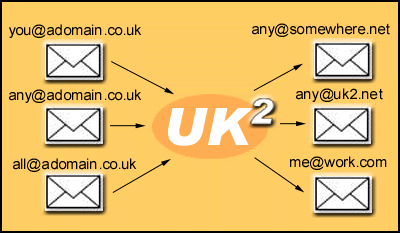
| With this menu you can choose which
names to automatically redirect to another email
address. |
Example
sales@domain.com -> myaddress@where.com |
| To delete an address, remove the
forwarding address and press the update button |
| To forward one address to several email
addresses (email+mobile phone SMS) create a mailbox on mail.uk2.net
and then use the redirect feature there. Do not enter
the same address twice here. |
|
|



